الرئيسية Who is it for? / Platforms and apps
How do I make an Arabic landing page for my platform or app?
Pick the platform template in the Entelak builder, write your features, plans and integrations and add your product screenshots, preview the site on real WordPress for free, then download it for a one-time SAR 109. The page is Arabic first, with an English version one click away.
What a site for platforms and apps needs
- A “Try for free” button on the front and in the menu, and the product inside a browser frame
- Features in a grid, each with what it solves for the user
- Plans with a clear comparison and what each tier holds
- The integrations and tools the product works with
- The trial questions: no card? where is data kept? is support in Arabic?
- An English version for those who need it
The trust signals your customer looks for
They sit right under the front, and you write them as they are in your papers; the template leaves them their place and invents nothing:
- A free trial without a card
- Where data is kept
- Arabic support and its hours
- The number of users or customers, if documented
The price
The ready template for this business: SAR 109 once, VAT included, with unlimited downloads. Designing and previewing on real WordPress are free. Hosting and the domain come from any provider you choose, or within Done for you from SAR 1,199.
In any Arab country
The site works from any Arab country: direction and fonts are Arabic by design, forms check mobile numbers for 19 Arab countries, and it publishes on any hosting that runs WordPress. Prices are in Saudi riyals, paid once.
The ready template
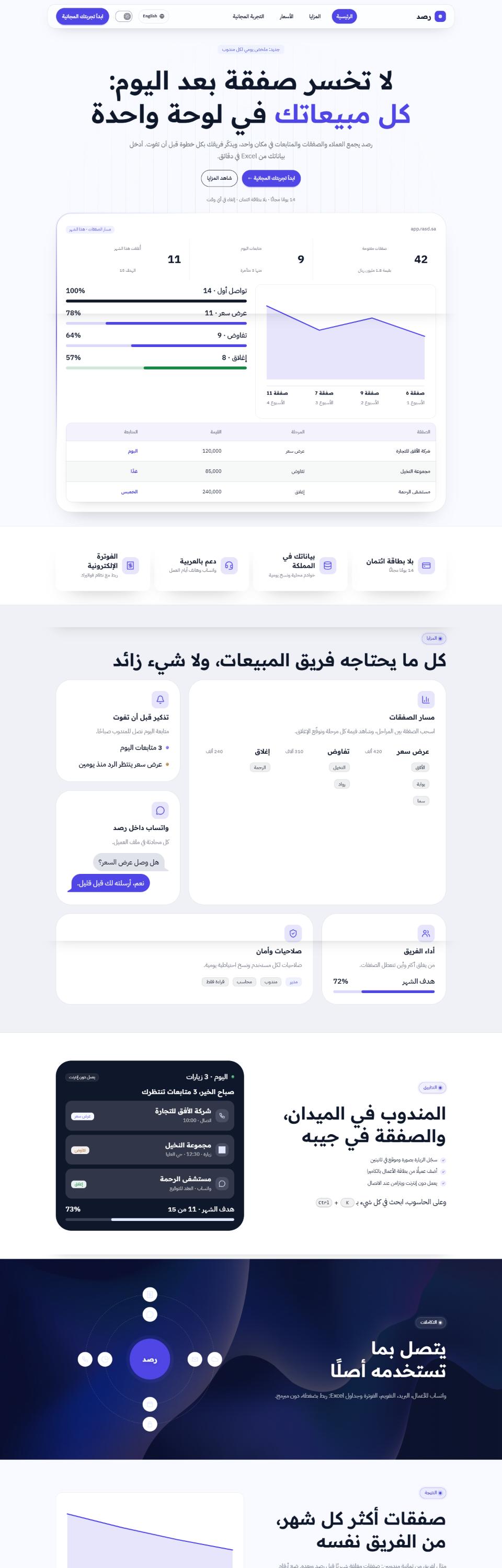
Rasd: platform and app
Gradient glass: The product inside a browser with light circling it, a feature grid the light follows, integrations orbiting the name and a plan comparison you can sort.
Its pages as you receive them
- Home (9 sections)
- Features (4 sections)
- Pricing (5 sections)
- Free trial (3 sections)
How it is done, in three steps
1
Open the platform template
In the builder, free.
2
Write your features and plans
And your product screenshots in place of the samples.
3
Preview, then download
A preview on real WordPress, then SAR 109 once.
Questions from platforms and apps
Before you start
What owners of this kind of business ask before making their site. Your question is not here? Message us.
Does the site handle sign-up or payment for the product?
The site is the landing and presentation page; the “Try for free” buttons send people to your app, where they sign up and pay.
Can the plan comparison be edited?
Yes, you write the plans and what each tier holds, and the visitor sorts them by price or name.
Is the page fast?
Yes, the site ships only what it uses, pictures shrink and load when needed, and there are no plugins.
Can I have an English page under /en/?
Yes. You add the language in the builder and an English copy of every page is created under /en/ with a switch.
Is there a subscription?
No. SAR 109 once for the theme.